How to Embed A YouTube Playlist on Your Website or Blog

 
how-to-embed-a-youtube-playlist-on-website-or-blog-video.jpg

Playlists are a great way to group videos of a similar theme on the YouTube website, but their reach can be boosted by embedding them on your website or blog for whatever reason you wish. In my case, I place an embedded playlist above my YouTube "Subscribe" widget - you can see it at the bottom of this site's sidebar - to add some visual clout to the widget and encourage new viewers to click for updates.

How to embed a YouTube video playlist 
how-to-embed-a-youtube-video-playlist-step-1.PNG

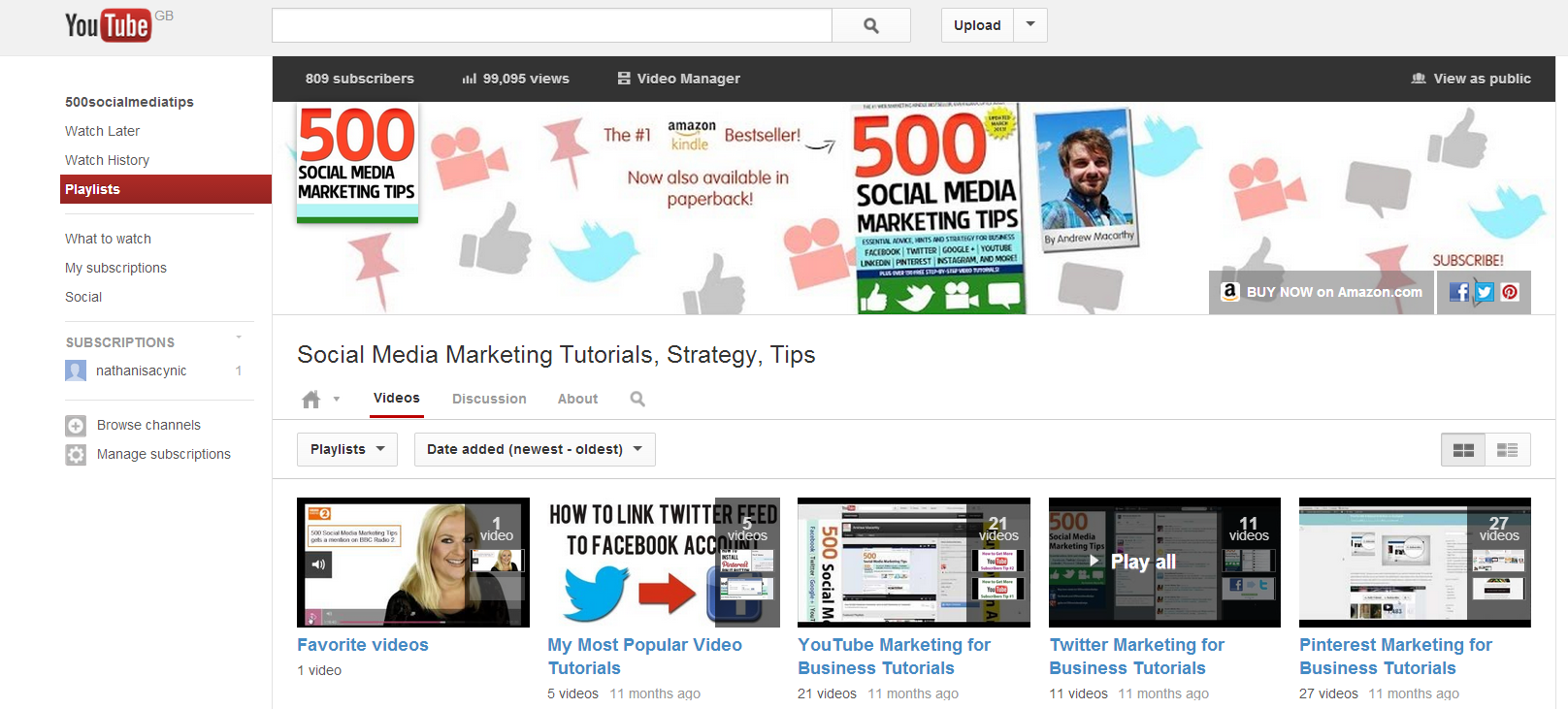
1. On your YouTube account, select "Playlists" from the menu on the left-hand side. On the Playlists page (pictured above), hover over the group of videos you want to embed and select "Play all" if you want to add a whole playlist from the beginning, or click on the name of  playlist and select an individual video from which you want the playlist to begin.  
how-to-embed-a-youtube-video-playlist-step-2.PNG

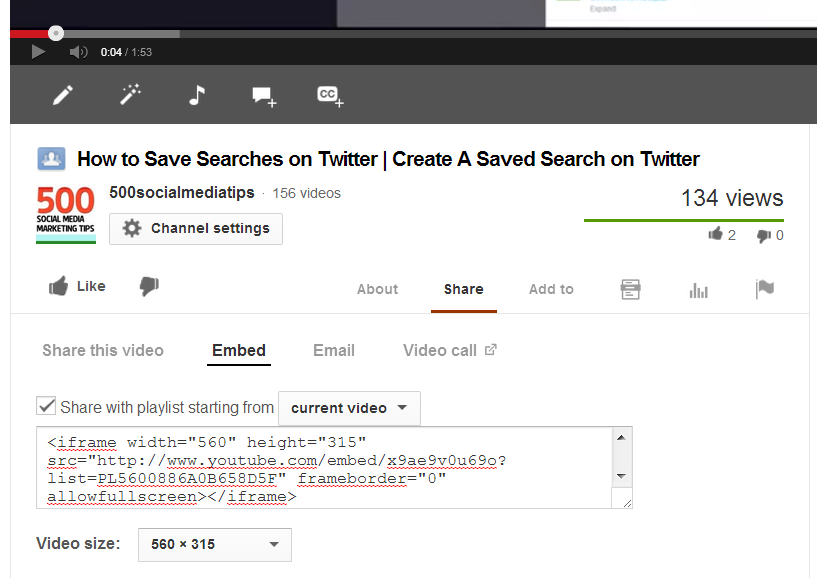
2. On the video page itself, select the "Share" and then "Embed" tab beneath the player. Use the drop-down menus to choose whether you want to begin the playlist from the current video or from the beginning, and at what size you want the video player to appear on your website.

3. When you're done, copy the embed code and paste it into the HTML on your website where you want it to appear, as I have done above.  That's it!


Buy 500 Social Media Marketing Tips

portrait-blog.jpg

Slideshare's Hyperlink Clampdown: A Demo and Workaround Tips


Slideshare is a fantastic tool for individuals and businesses to share ideas and reach an audience of many millions of people. And while the site enourages the publishing of insightful and helpful content, it looks now to be clamping down on those whose presentations don't quite share its priorities. As such, any links that appear on the first three slides of a Slideshare presentation will not be clickable. 

As you can see in the hastily-created four-slide demonstration above, the hyperlinks I have placed on the first three slides are not clickable, but the one on the final slide is.

In my book, 500 Social Media Marketing Tips , I recommend that Slideshare users include links in the opening slides of their presentations... not necessarily big, bold, and in your face, but at least given a presence in case a viewer takes notice but does not necessarily reach the end of the presentation. Better to have it appear even subtly than not at all! Placing it at the bottom of every slide, unobtrusively, is another alternatively. 

Now that this change has rolled out, I would not change my advice, but do suggest that if you are going to feature hyperlinks at the very beginning of your Slideshare presentations, that the URLs are short and memorable. If your links is long and complicated and  not clickable, the chances of someone taking the time to type it manually into their browser's address bar is slim to none.


Andrew Macarthy is the author of the #1 Amazon Web Marketing Bestseller, 500 Social Media Marketing Tips, available for Kindle and in paperback.

portrait-blog.jpg

How to Engage YouTube Viewers to Increase Audience Retention and Watch Time

Even though most YouTube content is no longer than a few minutes long, there are still plenty of barriers to the goal of having a viewer engaged to the very end of one of your videos once they have clicked on it, and that will put a heavy dent in arguably YouTube's most influential analytics - audience retention and watch time. Reasons for viewers not watching to the end of a video include:  

  • Video unexpectedly buffers early on
  • Viewer sees more appealing suggested video in sidebar
  • Video does not get to the point or be clear on what it will contain

It is the last bullet that I want to focus on for this blog. Once you have attracted someone to click on your content with a great title, description, and thumbnail image, it is so important to set expectations  or hook the audience in the first few seconds of the video. Here are two ways this technique can be used:

In how-to videos, show off the finished product first

No one wants to sit through even a few minutes of video instructions if they don't know what the end result will be, so if your video is a tutorial, show your audience what they will achieve at the end of the video in the first few seconds. 

Create intrigue to compel your audience to continue watching

Whether he pops onto screen with a fascinating fact or intrigues his audience with his tone of voice and location, Vsauce  does a great job of compelling his audience to continue watching, even though his videos are - in YouTube terms - very long. 

Similarly, you could use a teaser clip of a scene coming up in the video or a spoken line ike, "Want to know that links a pot of jello and a punch in the jaw? Keep watching to find out!" to hook in your audience. 


Buy 500 Social Media Marketing Tips
portrait-blog.jpg

The Facebook Passion Page Project Part 1: What is A Passion Page?

 
facebook-passion-page-project-part-1.jpg

What is the Passion Page project? 

The Passion Page project is a multi-part blog post series in which I'll be telling the story of the launch, growth, and hopeful monetisation of a Facebook Page, with very  little investment, both monetary and time-wise. My hope is that this will be a success, and that you will be able to replicate the process too.

In this first part, I'd like to introduce the concept of Passion Pages, explain how they differ from ordinary Facebook Pages, and why they could be lucrative for you and your brand. Without further ado, let's go... 

What are Passion Pages? 

Chances are that you have already encountered plenty of Passion Pages on Facebook, and you might even interact with them regularly. They're Pages that, rather than focus on a specific brand or product, instead post content that is centered around a specific theme or idea, either serious or silly - but mostly the latter. Two popular examples include "Welcome to the Internet" and "I fucking love science"

Why should businesses care?

Passion Pages are home to some of the most liked, commented-on, and shared content on all of Facebook. As a brand, it can sometimes be hard to juggle to image that you want to convey of yourself on your Facebook Page against the desire to post content that, however shallow (cute cats, sarcastic quotes, random funny images) will garner attention, and hopefully earn you some return on investment. This is where Passion Pages come in.

Passion Pages allow brands a separate space to experiment with different types of content - often light-hearted - without the risk of upsetting their existing fan base, but also provide an opportunity to subtly nudge viewers in the direction of your core Page or to introduce new revenue streams on the Passion Page itself. 

Think of Passion Pages as the Pinterest-y board side of Facebook; a place where companies can shine of the spotlight on the wider culture of their niche, however weird and wonderful that might be. To make up an example or two, McDonald's could launch a Passion Page called "I hate gherkins in my burgers" or one from Home Depot could be called "Epic DIY Fails." 

Coming up: The story of my own Passion Page

I launched my own Passion Page on Facebook in June 2013. With a very small initial investment, at the time of writing has over 2,500 fans, nearly 3,500 engaged users per week, a weekly reach close t 40,000 people, and attracts over 50 new fans per day.

 In the next part of this series, I'll be lifting the lid on my Passion Page, with a story of its history up to the present day.

 Will you be joining me on my Passion Page journey? Let me know in the comments below!


Andrew Macarthy is the author of the #1 Amazon Web Marketing Bestseller, 500 Social Media Marketing Tips, available for Kindle and in paperback.

portrait-blog.jpg

5 Ways to Use Facebook Embedded Posts for Effective Business Marketing


The introduction of embeddable Facebook posts allows brands and individuals to quickly and easily lift posts from their Pages and profiles to give the content a new and extended lease of life elsewhere on the web. Here are5 Ways to Use Facebook Embedded Posts for Effective Business Marketing :

1. Make blog posts more social

In times gone by, if a blogger wanted to highlight Facebook content on their site - whether their own or someone else's -  the best they could do was snap a screenshot and upload an image into their post. With embeddable posts, however, it is now easy to feature the content in question and allow readers to interact with it. 

2. Share positive endorsements

If a customer happens to post something lovely about your product or service and you happen to come across it, grab the comment, highlight it in a Facebook post, and embed it on your website. Visitors who see it will be able to boost the customer's sentiment by liking, commenting, and sharing the original post.

3. Make your posts as shareable as possible

Us social media folk are always harking on about making the content you post as eye-catching and engaging as possible, and embeddable Facebook posts give you another reason to keep on doing it. It goes without saying that the more attractive your posts, the more chance they have of being embedded by others... hopefully lots of times!

4. Keep the good stuff at the start

Similar to how long posts display in the News Feed, embedded Facebook posts will feature a "See more" link if the text of the status exceeds a certain character limit. If it is inevitable that your post will need one of these links, at least try to make sure the most imperative information is before the cut-off point. 

5.  Interactive press releases

Press releases are notoriously boring for journalists to digest, even if the wall of text facing them contains exciting information. Why not use the help of an embedded Facebook post to help make your next product announcement more exciting and interactive?

What ways will you be using Facebook embedded posts? Let me know in the comments below! 


portrait-blog.jpg

Andrew Macarthy is the author of the #1 Amazon Web Marketing Bestseller, 500 Social Media Marketing Tips, available for Kindle and in paperback.

Buy 500 Social Media Marketing Tips

Amazon US: http://www.amazon.com/dp/B007L50HE6
Amazon UK: http://www.amazon.co.uk/dp/B007L50HE6

Follow Me:
http://www.facebook.com/500socialmediatips/
http://www.pinterest.com/andrewmacarthy
http://www.twitter.com/500socialmedia

http://www.youtube.com/500socialmediatips