
LinkedIn Headline Tips and Examples 2013 | How to Write A Great Linkedin Headline

 
linkedin-headline-tips-tricks-examples.jpg

Your LinkedIn Professional Headline - that's the few sentences of bold text (120 characters maximum to be exact) that sits below your name on your LinkedIn profile - is one of the site's most overlooked sections, but actually pretty crucial to increasing how "findable" and enticing you are to potential connections. And if one of your main aims with LinkedIn is to leverage the site for professional gain, then a well-crafted Headline is imperative.

By default, LinkedIn populates your headline with your current job title and employer, and that's how great swathes of people leave it - bad move! Your Headline sits in a prime position on your profile, and can be used to share your expertise, promote your core marketing message, and exude your personality. In order to get recruiters or potential connections to stop and pay attention, use your Headline to tell them what you are, who you help, how you make their work/life better, and give proof that you are credible.

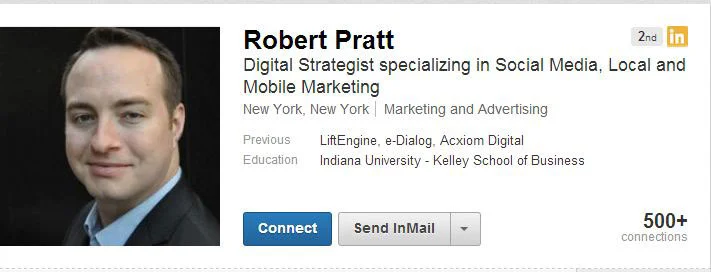
The way you craft your Headline depends on what your aims are, but here are five ways to do it well in a variety of situations:
headline.JPG

Showcase your speciality
With hundreds of millions of LinkedIn users, recruiters browsing LinkedIn are adept at breezing through hundreds of search results at a time, and if your Headline reads just something like "Project Manager, Miami Marketing, Co.", with nothing else about what you do, chances are they are going to skip right past it. A better example might read:

"Personal Trainer who helps clients reach peak fitness. Former head trainer for Swansea City FC."

linkedin-headline-example.JPG

Speak directly to your audience
LinkedIn is a global stage for everything you have to offer a potential employer or connection, so speak to them directly in your Headline. For example, if you were an expert in helping grow startup businesses, you might write:

"Customer-focused pro who can take your new venture startup to the next level. Also run seminars, workshops, and training."

Be specific
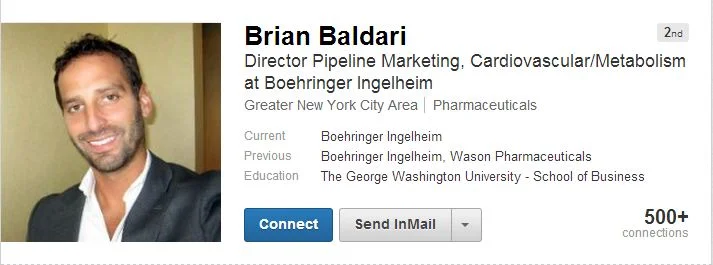
If your LinkedIn Headline told a recruiter you were a psychologist in California, what would really help to make you stand it out if you were even more specific. Remember, there will be thousands of profiles with bland and generic Headlines, so give yours the best chance of standing out. An example along the psychologist lines might read:

"Education-specialized psychologist; 15 yrs helping kids overcome learning troubles and develop socio-emotional abilities."
headline2.JPG

Include relevant keywords, but don't cram
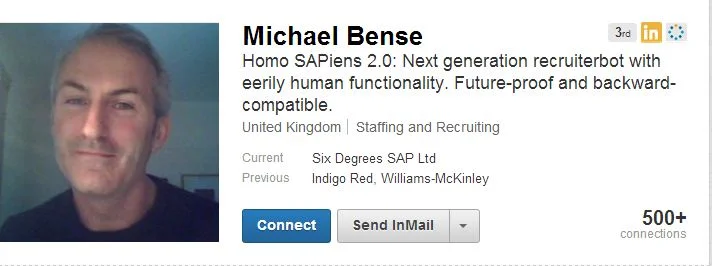
As well as crafting an appealing Headline, it is also important to consider keywords. Think about the kind of search terms the people you appeal to or want t connect with will be using to find you when recruiting via LinkedIn. Don't pile them into your Headline and damage its readability or flow, but do try to feature a couple of the keywords most important to who you are and what you can offer.  An example might read:

"Executive Recruiter who helps Fortune 500 companies find top tech talent. Clients include Microsoft and Apple."
linkedin-headline-example.JPG

Be creative, not generic
Writing a creative LinkedIn Headline can be a great way of boosting your personal brand and catching the attention of recruiters and connections, but for the love of all that is holy, avoid empty buzzwords and phrases like "outside-of-the-box thinker, " "problem-solver" or "strategic planner". These clichés mean nothing without context. At best they are cheesy, and at worst they will turn away many more people than they attract.

Supercharge your LinkedIn Profile!

Hopefully you've now got some real inspiration to go off and create an irresistible LinkedIn Headline. Get more strategy like this in my book, How to Create the Ultimate LinkedIn Profile in Under an Hour.  


ABOUT THE AUTHOR

Andrew Macarthy is the author of the #1 Amazon Bestseller, 500 Social Media Marketing Tips.

Buy 500 Social Media Marketing Tips (Kindle or Paperback)
Amazon US: http://www.amazon.com/dp/B007L50HE6
Amazon UK: http://www.amazon.co.uk/dp/B007L50HE6

Follow Me:
http://www.facebook.com/500socialmediatips/
https://pinterest.com/500socialmedia/
http://www.twitter.com/500socialmedia
http://www.youtube.com/500socialmediatips
Facebook Cover Photo Ideas For Business and Marketing

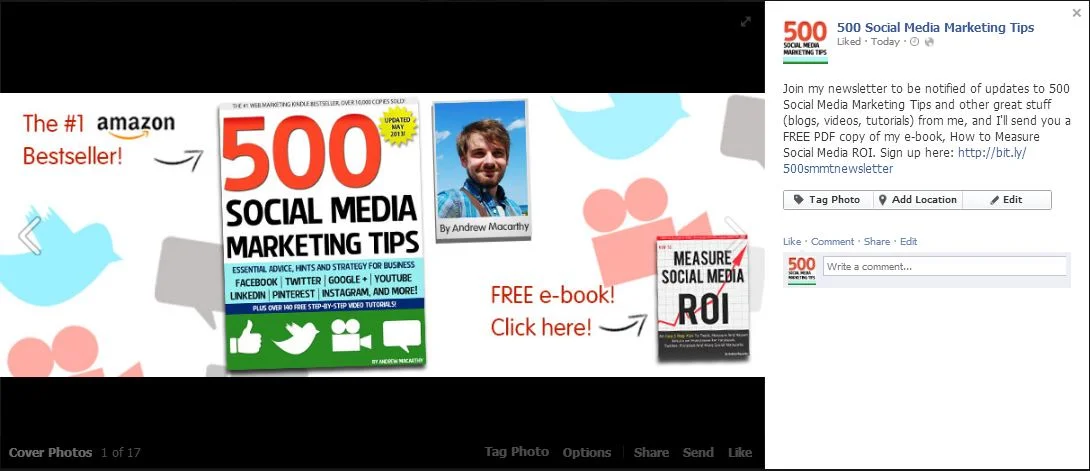
The relaxing of Facebook's cover photo rules a couple of months ago means that marketers now have a lot more freedom in the type of stuff they can add to the design of them - calls to action, contact details, asking people to like your Page, etc.... as long as the total amount of text does not make up more than 20% of the image.

The Facebook cover photo is a hugely powerful piece of prime real state for your Page, and people love  to get free stuff - so I have combined the two in my newest one, as you can see above, asking viewers to click to receive a free copy of my e-book, How to Measure Social Media ROI. 

fb.JPG

Of course, clicking on a Facebook cover image only enlarges the photo and does not load a new web page, but the action does  make the photo's description visible, and it's here that I have added the actual newsletter sign-up URL.

I hope this has given you some inspiration for your own Facebook Page cover photo! 


ABOUT THE AUTHOR
Andrew Macarthy is the author of the #1 Amazon Bestseller, 500 Social Media Marketing Tips.

Buy 500 Social Media Marketing Tips (Kindle or Paperback)
Amazon US: http://www.amazon.com/dp/B007L50HE6
Amazon UK: http://www.amazon.co.uk/dp/B007L50HE6

Follow Me:
http://www.facebook.com/500socialmediatips/
https://pinterest.com/500socialmedia/
http://www.twitter.com/500socialmedia
http://www.youtube.com/500socialmediatips
Video: Free Facebook Cover Photo Template Photoshop PSD

Download the template

This Facebook template (and several others for all the biggest social networks - expertly measured, simple to use, and up-to-date) is available instantly as a downloadable zip file via the purchase link above. For more information on all my social media templates, click here.

Note: Payment is fast and secure via PayPal, but you do not need a PayPal account to buy and download. 

Simply work around the template layers to add your design, save it as a .png file and upload it!


ABOUT THE AUTHOR

Andrew Macarthy is the author of the #1 Amazon Bestseller, 500 Social Media Marketing Tips.

Buy 500 Social Media Marketing Tips (Kindle or Paperback)
Amazon US: http://www.amazon.com/dp/B007L50HE6
Amazon UK: http://www.amazon.co.uk/dp/B007L50HE6

Follow Me:
http://www.facebook.com/500socialmediatips/
https://pinterest.com/500socialmedia/
http://www.twitter.com/500socialmedia
http://www.youtube.com/500socialmediatips

FREE YouTube Subscribe Button PSD 2013 - Large Size Download

 
youtube-subscribe-button-download-2013-free-large.jpg

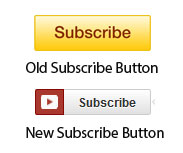
For some time now, YouTube has been sporting a new "Subscribe"  button on the site. Gone is the bright yellow, and in is a more stylish grey and red design that more closely matches the site's design.

old-new.jpg

A lot of people (including myself) place a Subscribe button at the end screen of their videos, and overlay it with a spotlight annotation to encourage viewers to subscribe to their channel. Only problem is, there didn't seem to be a nice, big version of the new Subscribe button design around to use. So with the tiny "Subscribe" button from a YouTube video page and a little Photoshop magic, I designed one myself - a large YouTube Subscribe button for 2013. 

Here's the original (120 x 26 pixels):  


youtube-subscribe-button-original.png

And here's my copycat attempt (2496 x 530 pixels): 

I'll be the first to admit that the image isn't an exact  copy... unfortunately my Photoshop skills don't extend that far at present, but it's pretty similar, and certainly better than the big ol' yellow monstrosity I'm using at the moment! Feel free to right-click and Save this image for use in your own YouTube videos or download the transparent PSD file from the following link:

http://min.us/lbcP6SNiSAQeNW  - hover your mouse over the image and click the 'Download' icon.  Link down? Tweet me @500socialmedia and I'll upload a new one!

If you know someone else who might benefit from this button, please share it with them. 

Example


Here's how the Subscribe button looks on my current YouTube end-screen. I hope you'll use it on yours too! 


ABOUT THE AUTHOR

Andrew Macarthy is the author of the #1 Amazon Bestseller, 500 Social Media Marketing Tips.

Buy 500 Social Media Marketing Tips (Kindle or Paperback)
Amazon US: http://www.amazon.com/dp/B007L50HE6
Amazon UK: http://www.amazon.co.uk/dp/B007L50HE6

Follow Me:
http://www.facebook.com/500socialmediatips/
https://pinterest.com/500socialmedia/
http://www.twitter.com/500socialmedia
http://www.youtube.com/500socialmediatips

How to Use Photos of You on Instagram For Business Marketing

Instagram has rolled out a new feature called "Photos of You," a way for users - businesses included - to tag people, businesses, and products in their photos on the app very similar to how tagging works on Facebook.

​Nike tags a photo on Instagram using the Photos of You feature.

For example, when Nike posts a photo of an athlete to its Instagram account, it can tag the photo so that the athlete can (if they wish) also add the photo to their stream, engaging the followers on Nike and of the athelete, and increasing the total amount of photo views. Individuals can tag their favourite brands in their own photos, and these could be picked up and shared on a brand's own feed.

Photos Of You gives brands a new level of consumer reach on Instagram,  driving them to interact directly with the brands and businesses they follow.

Will you be using Photos Of You on your own Instagram account? Let me know in the comments below!


ABOUT THE AUTHOR

Andrew Macarthy is the author of the #1 Amazon Bestseller, 500 Social Media Marketing Tips.

Buy 500 Social Media Marketing Tips (Kindle or Paperback)
Amazon US: http://www.amazon.com/dp/B007L50HE6
Amazon UK: http://www.amazon.co.uk/dp/B007L50HE6

Follow Me:
http://www.facebook.com/500socialmediatips/
https://pinterest.com/500socialmedia/
http://www.twitter.com/500socialmedia
http://www.youtube.com/500socialmediatips