Top 5 Hashtag Fails By Brands on Twitter | 60 Second Social Media Strategy

At times, Twitter can be a precarious place for brands and businesses. One day you're rolling along nicely, and the next you're the laughing stock or under the spotlight from millions of people.

In the 60 Second Social Media Strategy video above, you'll find a handful of companies whose chosen hashtags probably should have been double-checked before being given the go ahead...

Where to Find Content to Post on Social Media: A Complete Guide For Business

Where to Find Content to Post on Social Media: A Complete Guide For Business

One of the biggest questions businesses ask about social media strategy is "Where can I find content to post on social media?"  The following is a list of some of the sources I use and personally recommend to help make the job easier. Remember, however, that the items you find should only be used as portion of your content mix, and to inspire your own original posts - pumping out Socially Awkward Penguin memes every day is not going to get you very far!

Read More

Social Media Horror Stories: Ventra Chicago


In May 2014, Ventra - the company behind the contactless payment system for Chicago's public transport - announced that it was going to spend an hour answering questions about the service on Twitter. Ventra has been plagued with problems since its introduction (the system will be required use from July 2014), so predictably, the #AskVentra hour was hijacked by less-than-favourable queries. Here is a small selection of the tweets that were submitted...

Read More

How NOT to Tweet A Customer Who's Had A Car Accident (A Lesson in Tact and Timing)

There's no questioning the power of Twitter as a tool for conducting fast and effective customer service. It's a topic I've touched on in the past, most recently with examples of how the bakery Greggs uses Twitter to deal expertly with disgruntled patrons, general queries, and all manner of miscellaneous mentions of its brand.  

However, for every company that is handling customer service on Twitter like a baws, there's another that isn't quite on point; a situation made worse when its intentions were genuine and it obviously didn't mean to cause any harm. Case in point is the following example:

A friend, Pippa, was recently involved in a bit of a nasty car accident. Luckily, no one was seriously hurt. Here's the tweet she sent some time afterwards, complimenting Volkswagen more than anything...

That tweet was followed by another later on the same day. Sinclair Volkswagen, a local car dealer (presumably spotting a nearby mention of the brand) then replied...

The "very grateful to be waking up this morning" portion of Pippa's tweet should have been the first signal to Sinclair Volkswagen that her hunt for a new car wasn't being undertaken in the most positive or circumstances, and that some tact might be necessary in handling any interaction. If that didn't work (and it didn't), her reply to its friendly (and kind of promotional) approach - the first of any contact it had made - definitely cleared that up.

I must clarify that I'm positive Sinclair Volkswagen did not mean to cause any offence with its tweet and is no way a reflection of it as a brand as a whole, and I'm sure a simple and sincere apology to Pippa's reply to them would be more than enough to settle the matter. However, this example does demonstrate - as we see over and over again - how easy it for brands to cause upset on social media, especially if the necessary context is not sought beforehand, or if an eagerness to interact with customers is detrimental to the quality of the message sent.

Perhaps it's the inherent speed of communication on social media is also to blame; it's conditioned us all to reply to messages (both in our personal and professional circles) as soon as humanly possible, and to expect the same attention from others when we message them. 

Many marketers, including myself, advise that brands shouldn't leave customers hanging on social media while they wait for a response, or to pro-actively find them, but the example above reminds us that it always pays to take a step back to evaluate the situation in the first instance. No matter how well-intentioned a speedy response, one angry customer can cause an unexpected wave of negative publicity that no company wants to have to deal with.

Have you ever "tweeted before you think" or are you always careful to understand a customer's situation before you reply? Leave a comment to let me know.


Andrew Macarthy is a social media consultant and the author of the #1 Amazon Web Marketing Bestseller, 500 Social Media Marketing Tips.

Buy 500 Social Media Marketing Tips
Amazon US: http://www.amazon.com/dp/B007L50HE6
Amazon UK: http://www.amazon.co.uk/dp/B007L50HE6

Follow Me:
http://www.facebook.com/500socialmediatips/
http://www.pinterest.com/andrewmacarthy
http://www.twitter.com/andrewmacarthy
http://www.youtube.com/5
00socialmediatips

Twitter Header Image Template PSD | 1920 x 1200 Photoshop (New Design, April 2014)


Looking for a Photoshop PSD template for the new Twitter header image? You've come to the right place!

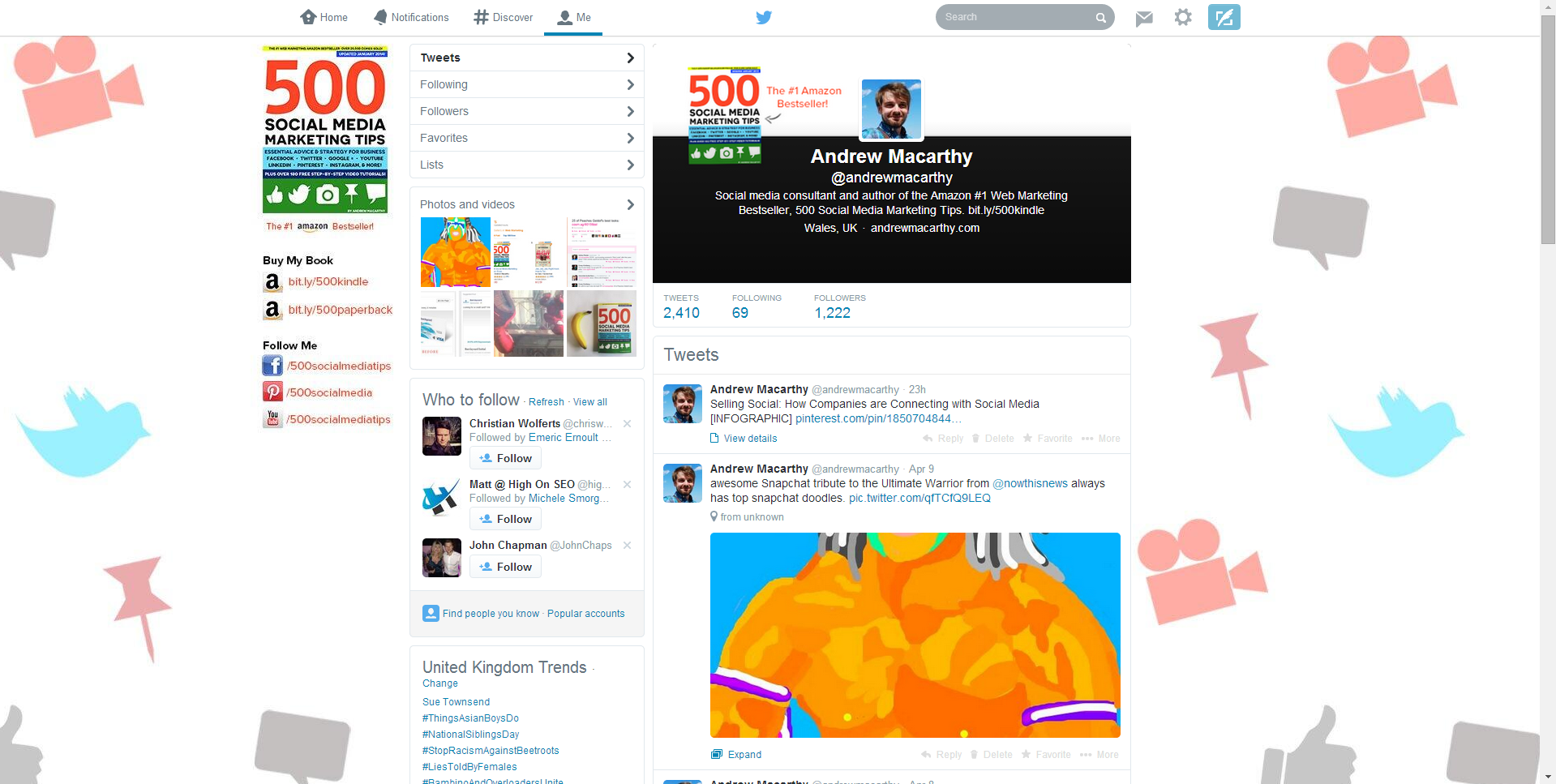
In April 2014, Twitter changed its desktop layout for the second time in a matter of months, this time significantly. As part of the update, gone are the small profile and header, replaced by images that are much bigger and wider.

Twitter layout with profile photo and header before:

twitter-header-template-2014.PNG

Twitter layout with profile photo and header now:

The recommended sizes for the Twitter header image and profile photo are 1500 x 500 pixels and 400 x 400 pixels respectively. However, Twitter automatically crops the header image upon upload, so the portion of it that is visible - and the position of the profile photo - differs depending on the screen resolution at which it is being viewed.

Therefore, in designing your Twitter header, you should aim to make sure that as many people can see the image as intended, whatever resolution they are viewing it at.

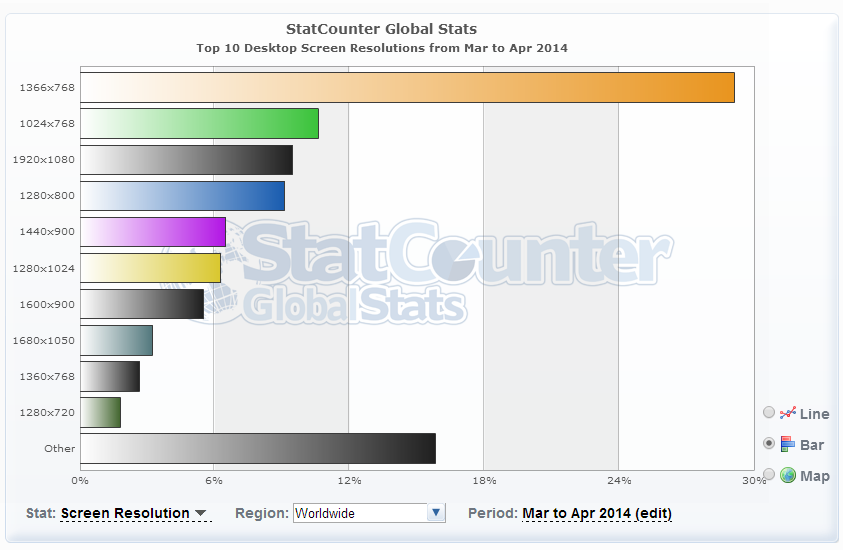
Global Statistics For Screen Resolutions

screen.PNG

According to the most recent global statistics (updated April 2014) the most popular screen resolution for viewing the web on desktops is 1366 x 768 pixels (around 28% of the total) followed by 1024 x 768 (around 8%). From these numbers (and those for less common sizes), we can estimate that the vast majority of people viewing your Twitter profile will be able to appreciate a cover design optimised for a 1366 x 768 pixel resolution. 

New Twitter Header Image and Profile Pic Template

Above is a snapshot of my Photoshop PSD template for the new Twitter layout's header and profile image. The full area of the image is Twitter's recommended 1500 x 500 pixels. Each of the coloured blocks represents the portion of the cover image visible at some of the most popular screen resolutions, e.g. yellow block = area visible at 1920 x 1200, red block = area visible at 1024 x 768.

The grey boxes represent the position of the Twitter profile photo at the same variety of resolutions.

As the statistics tell us that most people will be able to appreciate a header image designed for 1366 x 768 resolutions, the best idea would be to add your art work to cover the whole space, but keep the most important elements (logo, offers, contact info, etc.) in the area of the header visible to the most amount of people, i.e. the orange 1366 x 768 block.

Once your design is complete, hide all of the template layers and upload it to Twitter via the Edit Profile button on your profile.

Download the template (and 9 others)

This Twitter template (and many others for all the biggest social networks - expertly measured, simple to use, and up-to-date) is available instantly as a downloadable zip file via the purchase link above. For more information on all my social media templates, click here.

Note: Payment is fast and secure via PayPal, but you do not need a PayPal account to buy and download. 


Andrew Macarthy is the author of the #1 Amazon Web Marketing Bestseller, 500 Social Media Marketing Tips, available for Kindle and in paperback.

Buy 500 Social Media Marketing Tips
Amazon US: http://www.amazon.com/dp/B007L50HE6
Amazon UK: http://www.amazon.co.uk/dp/B007L50HE6

Follow Me
http://www.facebook.com/500socialmediatips/
http://www.pinterest.com/andrewmacarthy
http://www.twitter.com/andrewmacarthy

http://www.youtube.com/500socialmediatips