How to Choose A Powerful YouTube Thumbnail Image | 5 Examples of Effective Video Thumbnails


YouTube video thumbnails act as mini marketing posters for your videos, so the more clued up you are about using them effectively, the more clicks you will attract through to your content. Here are five examples of great YouTube video thumbnails:


1. Looks great at small and large sizes

youtube-thumbnail-examples-how-to-1.PNG

hilahcooking's 'How to Cook a Lobster' video wasn't the first to appear in YouTube's search when I went looking, but its branded thumbnail, complete with a quality close-up image of the cooked lobster, encouraged me to click on it over a handful of others.  And whether displayed in a big or small size across the site or on the web, the image always looks great.

2. Visually compelling

youtube-thumbnail-examples-how-to-2.PNG

Vlogger, Louis Cole, has experimented with several different types of thumbnails - often including channel branding - but has most recently settled on choosing one powerful image to represent the video. Whether you're a One Direction fan or not, you'd be hard-pressed not to be tempted to click through and see what all that crowd-filled craziness is all about! 

3. Close up of faces

youtube-thumbnail-examples-how-to-3.PNG

For most social media platforms (Pinterest being a notable exception), the appeal of connecting with viewers instinctively by using a close-up image of a human face, is extremely strong. And while this example is on the extreme end of the scale - after all, Barbie isn't a real person! - for people who see this thumbnail in search results and are hunting for a particular look, the effect is extremely powerful. 

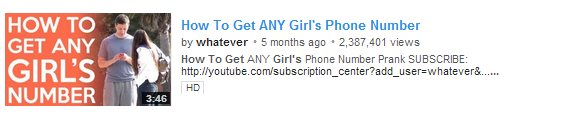
4. Foreground stands out from background

youtube-thumbnail-examples-how-to-4.PNG
With YouTube's background colour being white, many channels use this to their advantage with thumbnails that are a complete contrast. In this example from 'whatever', the bright orange leaps from the page to attract viewers who catch eye on this video in search results.
 

5. Accuately represents content

youtube-thumbnail-examples-how-to-5.PNG

This might be the most important point of all. One of the worst things any content creator on YouTube wants to do is to mislead their audience, so implementing a custom thumbnail that is a true representation of the video itself, is very important in helping to build loyalty and trust. While the above example might not make for the most exciting thumbnail image, it is a fair and true reflection of what the video is about and does its job very well.


How to Embed A Facebook Post | Facebook Embedded Posts Tutorial


What are embedded Facebook posts? 

Embedded posts are a way to lift publicly shared content from Facebook - either from a Page or personal profile - and place it on your website or blog. Embedded posts show any media attached to them, as well as the number of likes, shares, and comments associated with it. Even better, viewers are be able to follow or like authors or Pages on Facebook direct from the embedded content.

How to embed a Facebook post: getting the code

Before you embed a Facebook post, first you'll need to ensure that it is public. Do this by hovering over the audience selector next to the date of the post. If the post is public (signified by a globe icon), you're good to go.

Click on the 'down arrow' icon that appears in the top right corner of the post on Facebook and choose Embed Post from the drop-down menu that appears.

A pop-up window will appear along with the embed code for the post you want to use. Simply copy this code and paste it into the section of your website or blog post that you want it to appear.

Embedding Facebook posts FAQs

  • Currently, you can't customize how embeded posts are displayed on your website. The size of the post will be fixed to the same dimensions that it is displayed at on Facebook.
  • Long posts will be truncated. Viewers will be shown a "see more" link that can be clicked to view the embedded post in its enterity.
  • If an embedded post is later deleted or hidden by the original author, it will be replaced by a message that tells readers that that this is the case.

Live example of an embedded Facebook Post


Andrew Macarthy is the author of the #1 Amazon Web Marketing Bestseller, 500 Social Media Marketing Tips, available for Kindle and in paperback.

Buy 500 Social Media Marketing Tips
Amazon US: http://www.amazon.com/dp/B007L50HE6
Amazon UK: http://www.amazon.co.uk/dp/B007L50HE6

Follow Me:
http://www.facebook.com/500socialmediatips/
http://www.pinterest.com/andrewmacarthy
http://www.twitter.com/500socialmedia

http://www.youtube.com/500socialmediatips

portrait-blog.jpg

4 Ways Snapchat is A Great Marketing Tool For Brands and Businesses


Snapchat's growth over the past two years has been incredible, and with over 200 million photos and videos shared by its users every day, it is fast gaining the attention of brands and marketers who want a piece of its young and engaged audience. 

I'll save the particular methods of promotion using Snapchat for another time, but in this blog you'll learn four ways in which the make up of the app means that it is a great marketing tool for brands and businesses. 

1. The scarcity and exclusivity of its messages

Once a Snapchat users receives and opens an image or video, they have a maximum of 10 seconds to view it before it disappears and they can not access it again. For brands, this provides a sense of scarcity that posting to other social networks like Facebook or Instagram cannot provide. 

For brands who want to offer vouchers or promotions through Snapchat, the app provides a means by which the offer can be limited only to its followers, with no chance of it going viral as it'll disappear shortly after opening. That theory might sound counter-productive at first, but the feeling a consumer gets when they feel part of something small and exclusive is hugely powerful in terms of garnering brand loyalty.

The image above shows a promotion by New York-based 16 Handles, which exemplifies this approach.

2. The unexpectedness and surprise in its messages

The disposable nature of Snapchat's messages is loved and accepted by the app's millions of users, and brands can use this to their advantage. Many Snapchat viewers see receiving a message as a present. There's no way of knowing what it contains until a user opens it, and this element of surprise can be harnessed by marketers to provide all manner of messages and promotions.

3. The purity of its messages

Unlike Instagram with its carefully orchestrated photos and filters, Snapchat photos - because they have to be consumed so quickly - encourage a purity of message that its rivals cannot. This frees brands from the habit of overthinking or micro-managing the message they want to construct, and sets them free to provide content that is off the cuff, "real", and that will resonate with their audience. The example above is a photo sent by Taco Bell to its followers on Snapchat to promote its Beefy Crunchy Burrito - simple but effective.

4. The brevity of its messages

Being that Snapchat messages only exist for a matter of seconds, there is little room for pride or embarrassment from the sender. While it is clear to see how this would relate to individuals (particularly in the prevalence of "adult" messages being sent between users!), it also has significance for brands, who can move on from misjudged or poor-performing content in no time at all. In comparison, if you posted a status update on Facebook, it lingers there for a lifetime in comparison to Snapchat. And if that content was poorly received, there is plenty of time for your audience to communicate their dissatisfaction.


ABOUT THE AUTHOR
Andrew Macarthy is the author of the #1 Amazon Web Marketing Bestseller, 500 Social Media Marketing Tips, available for Kindle and in paperback.

Buy 500 Social Media Marketing Tips
Amazon US: http://www.amazon.com/dp/B007L50HE6
Amazon UK: http://www.amazon.co.uk/dp/B007L50HE6

Follow Me:
http://www.facebook.com/500socialmediatips/
https://pinterest.com/500socialmedia/
http://www.twitter.com/500socialmedia
http://www.youtube.com/500socialmediatips

portrait-blog.jpg

How to Share Instagram Photos to A Facebook Page | Post Instagram Images to Facebook Page


The introduction of hashtags on Facebook have made the effect of sharing Instagram images onto social media even mor powerful. If you want to set your Instagram app account up to share photos right to your Facebook Page - not your personal timeline - here are some simple instructions:

1. Open up the Instagram app and visit your profile page 

2. Click on the cog icon at the top of your profile page 

3. Click on the "Share Settings" option

4. Click on "Facebook"

5. Click on "Share Photos to" ...

6. Choose your Facebook Page from the "Choose A Page" list

And that's it! Now, when you share a photo from Instagram to Facebook, it'll go straight to the Facebook Page you chose. 


ABOUT THE AUTHOR

Andrew Macarthy is the author of the #1 Amazon Web Marketing Bestseller, 500 Social Media Marketing Tips, available for Kindle and in paperback.

Buy 500 Social Media Marketing Tips
Amazon US: http://www.amazon.com/dp/B007L50HE6
Amazon UK: http://www.amazon.co.uk/dp/B007L50HE6

Follow Me:
http://www.facebook.com/500socialmediatips/
https://pinterest.com/500socialmedia/
http://www.twitter.com/500socialmedia

http://www.youtube.com/500socialmediatips

portrait-blog.jpg