One Year Of YouTube Video Marketing: 5 Most Important Lessons Learned
/
It's nearly been a whole year since I started to create and post videos to YouTube in support of my book, 500 Social Media Marketing Tips. I knew that video, in theory, could be a great tool in helping me promote the book, and that it wouldn't have to take too much time or effort - so with nothing to lose, I began. I can't say for sure how much my YouTube content has impacted the sales of my book, but I do know that it hasn't done any harm, and I even use it as a selling point, shouting about it on 500 Social Media Marketing Tips' front cover.
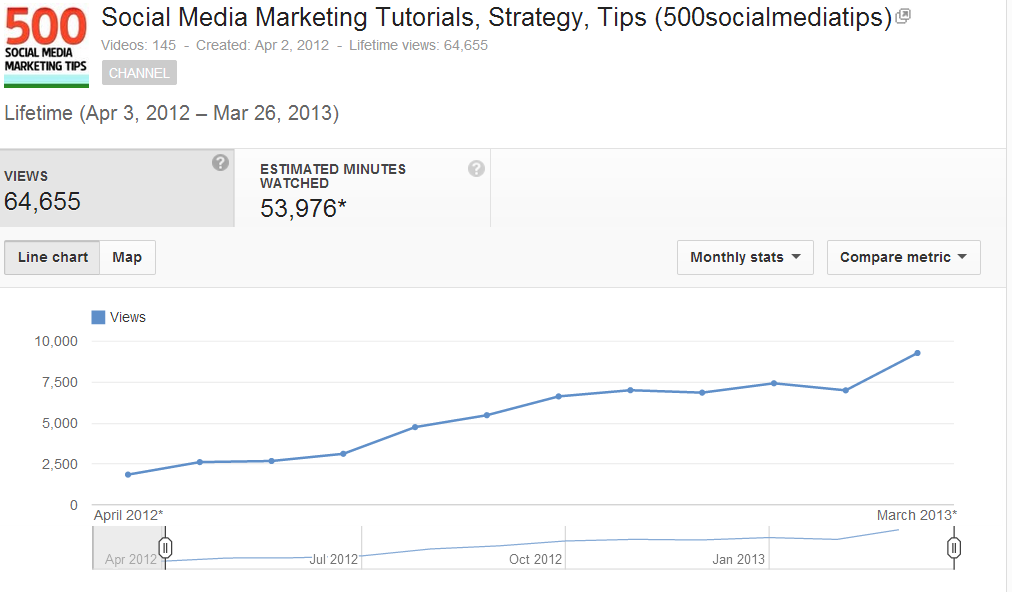
My first video was posted on April 6, 2012, and as I write my channel's current statistics stand at:
- 485 Subscribers
- 63,655 views
- 53,976 minutes watched
Not spectacular figures by any stretch of the imagination, I know, but not too shabby either. My viewership and subscribe rate has grown in a steady upwards trend since the beginning, and for the past few months my video views have reached over 8,000 per month, with around 70 new subscribers per month too. With all that in mind, here are 5 of the most important lessons I have learnt in the past year of video-making for YouTube.
1. Be Consistent
Consistency is so important in growing a YouTube audience. Mostly every big YouTube channel sticks to a schedule, and so it's something I've tried to emulate. I post a new video at least once a week, and perhaps up to two or three if the situation calls for it - e.g. reporting on the roll out of Facebook Graph Search or the new YouTube layout just after it's announced. If your audience knows you are going to be posting content on a regular basis, they're more likely to subscribe to be sure not to miss it. And naturally, the more videos you have out there, the more views you will notch up over time.
As a side note on the consistency thing, none of my videos have gone viral, nor does one single video represent the bulk my statistics. In fact, there is less than 3,000 total views between my best-performing and 10th best-performing videos.
2. Offer Value
Many people search YouTube to learn or get help in carrying out certain tasks, and that's what my videos set out to do - offering simple tips and tricks for social media. If your content is valuable (as apposed to solely promotional), then viewers are more likely to like, comment, and share with others. Let your helpful videos promote your brand or product by positive association.
3. Quality Matters
As well as offering value, the quality of your videos is also an important consideration. If you're getting comments like "240p, we meet again" or "Was this video filmed with a potato?", you probably want to invest a little more in your equipment before you post more content. That doesn't mean you have to rush out to spend thousands of dollars, however - the average smartphone these days has a decent recording quality for most YouTuber's needs. People don't expect a Hollywood production, but you should at least test to make sure that your video isn't shaky and that the audio sounds okay. Some simple editing with something as basic as iMovie or Windows Movie Maker can also go a long way.
4. Keep Videos Short
Rare is the YouTube viewer who wants to spend 10-15 minutes watching a video to help them discover what they want to know, so get to the point fairly quickly! My videos are deliberately short (mostly well under 5 minutes long) and even that is a tough sell, as my Audience Retention statistics - the people who watch the whole of each video - hovers at around the 65% mark. Of course, part of that is down to me and the video content itself, but it clearly shows that people's attention spans are short on YouTube, no matter how long your videos. And if they're skipping over your videos, they're probably looking at the competition's instead! If your message has to be long, then separate it into several shorter videos.
5. Spread the Word
YouTube alone is a fantastic platform for getting video content seen, but there's no harm in giving your hard work an extra. Don't forget to share your videos with readers and fans on your blog, and on social networks including Facebook, Twitter, and Pinterest. You never know who might see it, and something like a re-tweet from someone with thousands of more followers than you have is always a welcome bonus!
Conclusion
So that's it, 5 of the most important lessons I have learned from my first year of video-making. Certainly nothing there that will break the mould, but definitely some pointers that are worth remembering. My first year of video-making has been a fun learning experience for me and I can't wait to see what happens over the next twelve months!
What is your YouTube strategy like, and what lessons have you learnt on the way? Let me know in the comments below!
ABOUT THE AUTHOR
Andrew Macarthy is the author of the #1 Amazon Kindle Bestseller, 500 Social Media Marketing Tips.
Buy 500 Social Media Marketing Tips
Amazon US: http://www.amazon.com/dp/B007L50HE6
Amazon UK: http://www.amazon.co.uk/dp/B007L50HE6
Follow Me:
http://www.facebook.com/500socialmediatips/
https://pinterest.com/500socialmedia/
http://www.twitter.com/500socialmedia/
http://www.youtube.com/500socialmediatips