How to Create A Great YouTube Channel Trailer

There's always reluctance when sites like YouTube make major changes to their layouts, forcing millions of users to adapt or get left behind, but the reasons for change often become apparent after a short period of adjustment. In the case of the YouTube One Channel layout, I think the option to have a 'trailer' for your channel autoplay to all unsubscribed viewers who land on your channel page is a brilliant idea.

In my newest video tutorial, I show how to create a great little channel trailer, and how to optimize it to entice the most subscribers as possible. 


ABOUT THE AUTHOR

Andrew Macarthy is the author of the #1 Amazon Kindle Bestseller, 500 Social Media Marketing Tips. 

Buy 500 Social Media Marketing Tips
Amazon US: http://www.amazon.com/dp/B007L50HE6
Amazon UK: http://www.amazon.co.uk/dp/B007L50HE6

Follow Me:
http://www.facebook.com/500socialmediatips/
https://pinterest.com/500socialmedia/
http://www.twitter.com/500socialmedia/
http://www.youtube.com/500socialmediatips
 

My YouTube One Channel Trailer: A YouTube Trailer Example

One of the coolest parts of the new YouTube One Channel design is the ability to add a 'trailer' to your channel page. This video will play to unsubscribed viewers when they land on your profile, and can be used as a way to entice them to subscribe.

Best practices for this kind of video include keeping it short and sweet (around 30 seconds max), showing your audience what your channel can offer them, and giving them a call to action at the end. 

Check out my channel trailer above. My video editing skills don't go far beyond Camtasia's basic editor, so I used Animoto.com to create something a lot snazzier with relative ease. 

Have you created a trailer for your YouTube channel? Post a link below so I can check it out!


ABOUT THE AUTHOR

Andrew Macarthy is the author of the #1 Amazon Kindle Bestseller, 500 Social Media Marketing Tips. 

Buy 500 Social Media Marketing Tips
Amazon US: http://www.amazon.com/dp/B007L50HE6
Amazon UK: http://www.amazon.co.uk/dp/B007L50HE6

Follow Me:
http://www.facebook.com/500socialmediatips/
https://pinterest.com/500socialmedia/
http://www.twitter.com/500socialmedia/
http://www.youtube.com/500socialmediatips
How to Get the New YouTube One Channel Layout 2013 | (YouTube One Channel Design 2013)

 
youtube-one-channel-design-how-to.jpg

Following a limited beta, YouTube has now made its new One Channel design available to all users.  Here's why YouTube says it is making the change:

“The main focus of this update is to make your new channel look great on browsers across all screens and devices. It will also help you convert more visitors into subscribers with a slot for a channel trailer, and you can customize how you organize your videos and playlists so it fits your programming strategy.”

How to Enable YouTube One Channel Design

1. Go to http://www.youtube.com/onechannel
2. Scroll to the bottom of the page and click the button to enable the channel.

I have put together a template for you to easily create channel art work that will look great on all screens, from smartphones to televisions. Click here for instructions and a download link for the template.


ABOUT THE AUTHOR

Andrew Macarthy is the author of the #1 Amazon Kindle Bestseller, 500 Social Media Marketing Tips. 

Buy 500 Social Media Marketing Tips
Amazon US: http://www.amazon.com/dp/B007L50HE6
Amazon UK: http://www.amazon.co.uk/dp/B007L50HE6

Follow Me:
http://www.facebook.com/500socialmediatips/
https://pinterest.com/500socialmedia/
http://www.twitter.com/500socialmedia/
http://www.youtube.com/500socialmediatips
YouTube One Channel Template 2013 Layout FREE Download Photoshop PSD

 
youtube-one-channel-template-photoshop-psd-download-2013.jpg

YouTube has begun to roll out a new channel layout, which it is calling the One Channel design. At the time of writing (March 1st, 2013), the new layout is in limited beta to a select few people, but will soon be available to all. In this post, you will find a few tips to help you prepare your channel to make the most of the new layout, as well as Photoshop .psd template to help you quickly and easily create artwork that fits the new layout and displays optimally on all devices, from smartphones to massive HD televisions. 

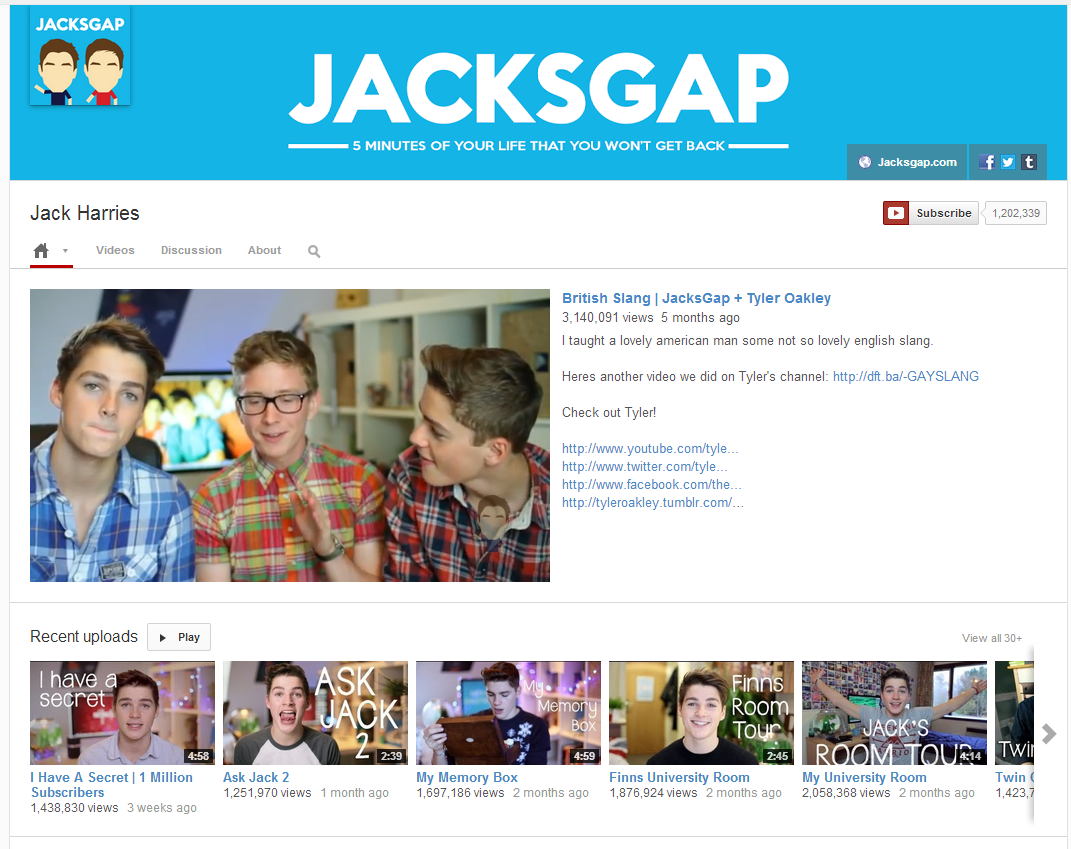
jacksgap-one-channel.PNG

Above is an example of the new YouTube One Channel template, which you can see is a lot more minimalist in fashion than the current layout. The artwork features the channel's profile photo to the left and links to the channel's website and social media profiles on the right. This particular design is the desktop display, but the One Channel layout's art will display differently depending on the device the site is being viewed on, so your art and template must be prepared accordingly.

Now here's the template for the One Channel layout. YouTube recommends uploading an image that is 2120 x 1192 pixels in size. The area shaded green covers the art that will be seen on TVs, the yellow (full width of image) covers the maximum that will be seen on desktop, the blue area marks the boundaries of the design seen on tablets, and the pink rectangle marks the space where the art work will be seen at a minimum on desktops, and on mobile devices.

In the above example, I have edited the template to feature a design that sits only within the safe (pink) zone, which will show on all devices, from televisions to smartphones. Your art could spread across the whole area of the template - where I just have white - but it is crucial that the most important portion of the design (i.e. the one you want all viewers to see) is within the safe (pink) zone.

I hope this blog post has given you a little better understanding of the new YouTube One Channel Layout. 

Download the template

This template and many others - expertly measured, simple to use, and up-to-date) is available instantly as a downloadable zip file via the purchase link above. For more information on all my social media templates, click here.

Note: Payment is fast and secure via PayPal, but you do not need a PayPal account to buy and download. 

Get the templates FREE

Alternatively, buy a copy of my #1 Web Marketing Bestselling book500 Social Media Marketing Tips,  on Kindle or in paperback, and receive a link to download all of my social media templates for free - you'll find it located in the Social Media Templates chapter. 


ABOUT THE AUTHOR

Andrew Macarthy is the author of the #1 Amazon Kindle Bestseller, 500 Social Media Marketing Tips. 

Buy 500 Social Media Marketing Tips
Amazon US: http://www.amazon.com/dp/B007L50HE6
Amazon UK: http://www.amazon.co.uk/dp/B007L50HE6

Follow Me:
http://www.facebook.com/500socialmediatips/
https://pinterest.com/500socialmedia/
http://www.twitter.com/500socialmedia/
http://www.youtube.com/500socialmediatips

How to Bulk Edit YouTube Videos With Bulk Actions | Edit Multiple Uploads at Once

 
youtube-bulk-edit-videos.jpg

YouTube has recently launched a very helpful feature for content creators, which allows them to edit numerous parameters across multiple videos all at the same time. Called Bulk Actions, it removes much of the hassle of editng stuff like the descriptions, privacy, and comment settings on one video at a time. Here's how to use YouTube Bulk Actions:

youtube-bulk-actions-1.png

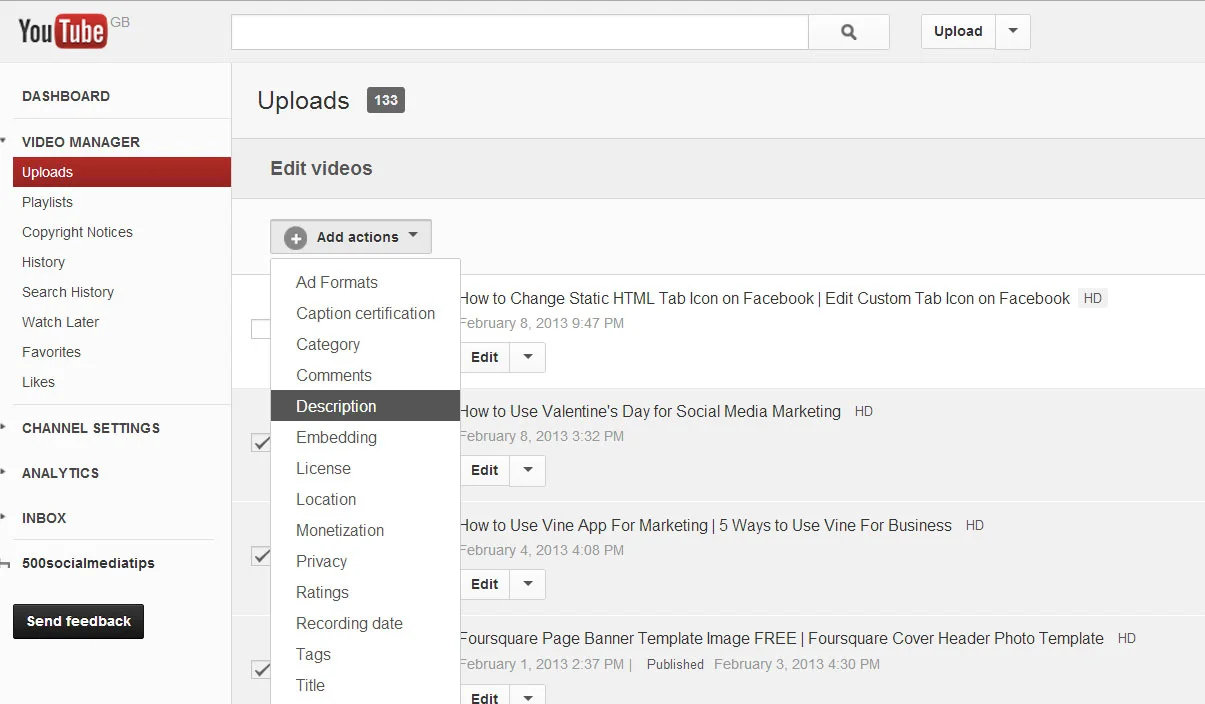
1. Inside Video Manager, check the videos you want to edit in bulk and choose 'Advanced' from the Actions drop-down menu.

youtube-bulk-actions-2.jpg

2. Select the parameters you want to edit in bulk from the next drop-down menu. You have to select them one at a time, but you can choose as many as you like to add to a list of parameters that will all be changed at the same time.

youtube-bulk-actions-3.jpg

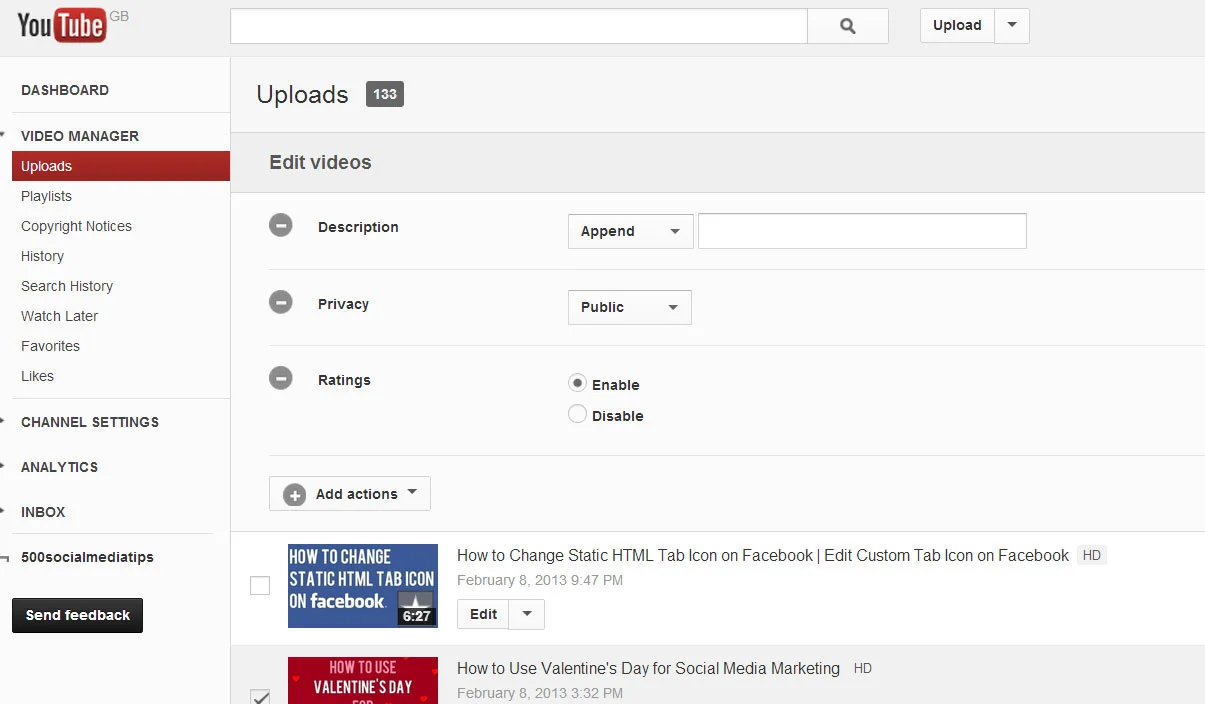
3. Make the required changes to each parameter, e.g. Description, Privacy, and Ratings in the above example. When done, click 'Submit'.

And that's it! How useful will you find YouTube Bulk Actions for editing multiple videos at a time? Let me know in the comments below!


ABOUT THE AUTHOR
Andrew Macarthy is the author of the #1 Amazon Kindle Bestseller, 500 Social Media Marketing Tips.

Buy 500 Social Media Marketing Tips
Amazon US: http://www.amazon.com/dp/B007L50HE6
Amazon UK: http://www.amazon.co.uk/dp/B007L50HE6

Follow Me:
http://www.facebook.com/500socialmediatips/
https://pinterest.com/500socialmedia/
http://www.twitter.com/500socialmedia/

http://www.youtube.com/500socialmediatips