101 Social Media Post Ideas for Business: Increase Engagement & Never Run Out of Content Again

One of the most difficult tasks for a social media manager is constantly coming up with fresh and exciting ideas for your social media profiles. When you've got 365 days to fill and often multiple time-slots to fill, that's one tricky task. Of course, post recycling can go a long way to plugging the gaps, but if you need some new and and exciting ideas to inspire you,  this post will help!

Below, you'll find a mighty 101 social media post ideas for business. Some are obvious, some less so, but all are paired with a real-life example from big brands to show you how you could go how you might want to create something similar. Ready? Let's go.

Read More
5 Strategies to Make Effective Pinterest Content Super Quickly

5 Strategies to Make Effective Pinterest Content Super Quickly

5 Strategies to Make Effective Pinterest Content Super Quickly

Creating brilliant content for social media - especially for multiple platforms - can be a real time sink. I'm a big advocate for re-purposing content to save time and conserve energy for other tasks. After all, why put all that effort in and not make the most out of what you create.

In a recent blog, Pinterest revealed several strategies for re-purposing images from other social networks to turn them into content perfect for your Pinterest feed - the type of visuals proven to perform better on the platform - specifically, vertical format images. Below, I've picked out some of these ideas (along with a few of my own) and mocked up examples to show you how they could work in the real world.

They're simple, quick, and effective, so let's take a look.

1. Crop a Facebook ad image

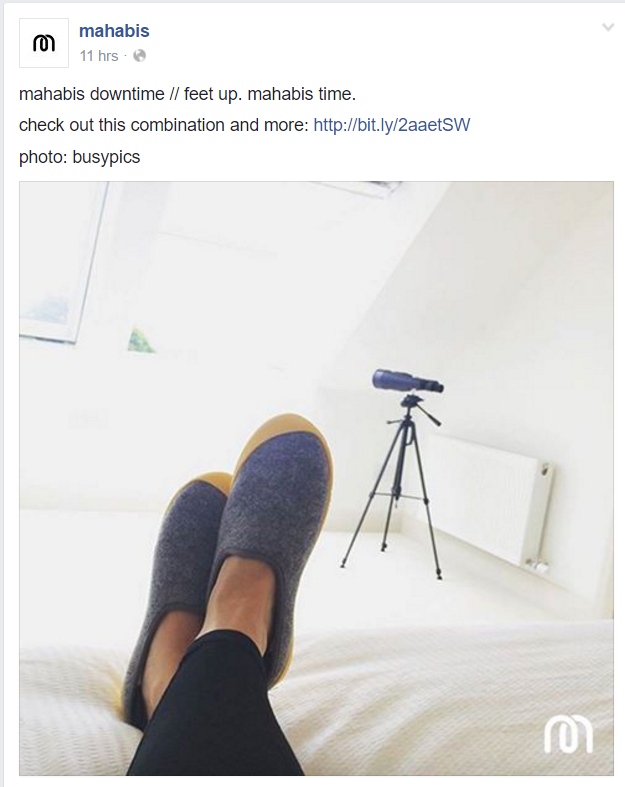
Facebook ad images are, with nothing more than a quick crop, can be transformed into ideal content for Pinterest. In this example, you can see a Facebook image by Mahabis alongside a cropped version that would work just as nicely as a narrow Pinterest pin. Add in the logo, et voila.

2. Stack multiple Instagram images

Oftentimes, brands will post multiple Instagram images linked by a theme. In the case of Omega below, it shared several images to show off its product links to the Olympic Games in Rio, along with brand ambassadors. In the second image, I have stacked four of these images to create a post that would work great on Pinterest, turning four squares into one large collage.

Where pertinent, use a tool like Photoshop or Canva to add a text overlay. In an A/B test by Pinterest, a multi-product Pin with text overlay had 7 times more engagement than a Pin with a single product.

3. Re-purpose a website or email newsletter banner

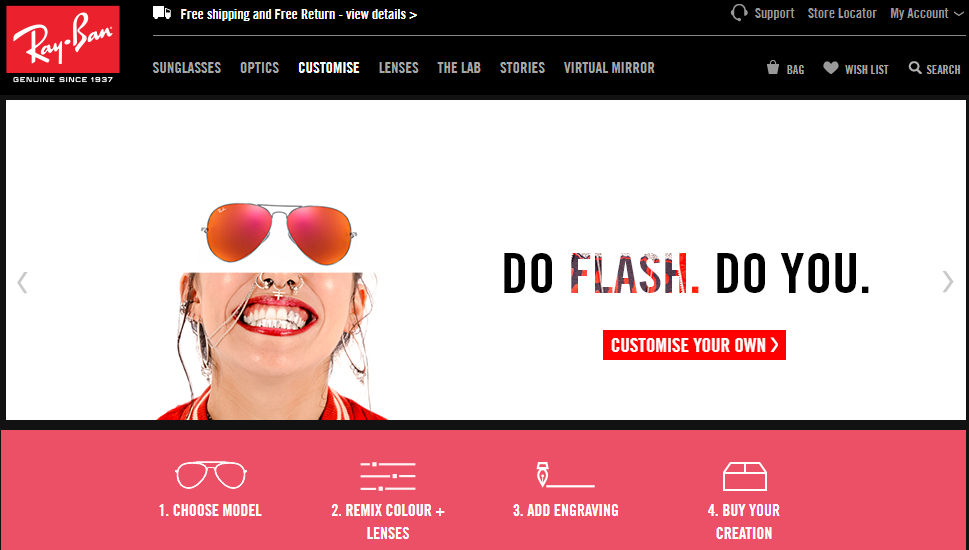
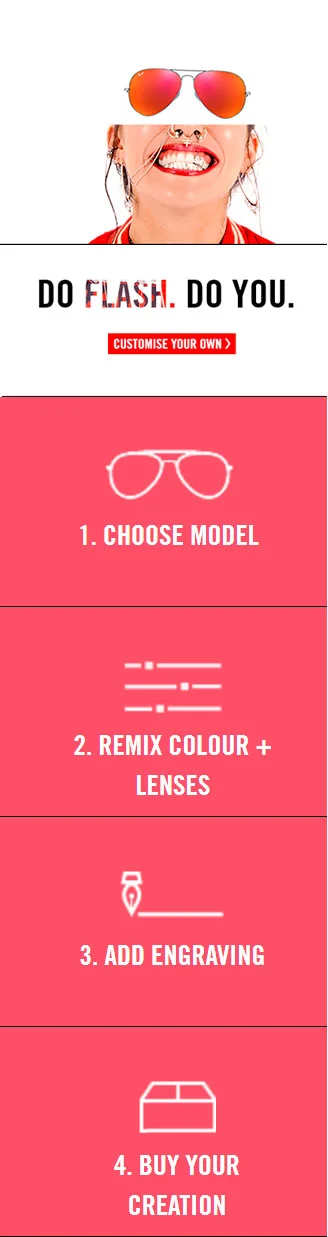
Website banners and email header images can be a great source of quick Pinterest content, with a little bit of editing magic. Take the first image below,  a banner from Ray-Ban's website advertising four steps to buying custom shades. By chopping the image up and stacking the elements together - as seen in the second image below - I created a new piece of content that is perfect for Pinterest.

4. Share Twitter Testimonials

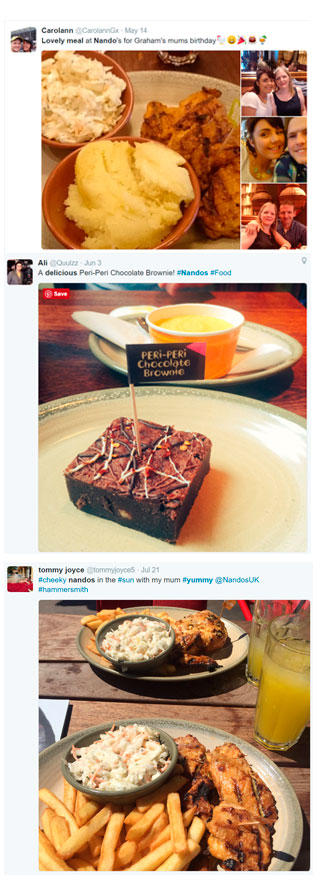
Typically, Pinterest isn't the first place where your customers will go to rave about their experience with your product or service, but if you do receive high praise (such as on Twitter), why not gather a few of the testimonials together and use them in one single Pinterest post? In the example below, I have stacked three separate testimonials for the restaurant, Nando's. With a bit of branding and a clever caption, this kind of social proof can be just as powerful as any carefully-crafted ad image.

5. Dont' forget GIFs

Despite the explosion in popularity of GIFs on social media, they make up only a small proportion of content on Pinterest. Whether it's a GIF you have made specially for another platform, or if you re-purpose a video down into a few of its most engaging seconds, a nice GIF can really help your brand stand out on Pinterest. Make an eye-catching loop, demo a product, etc.

Over to you

What strategies do you use to re-purpose content for Pinterest? Will you be making use of any of the ideas above? Let me know in the comments below!

5 Examples of Boring Businesses That Prove ANY Brand Can Win on Social Media

Do you run what might be considered a "boring" business? Think you can't make a meaningful impact on social media? Think again!

Just because you're not a sexy fashion company or trendy coffee shop doesn't mean that you can't draw inspiration from other "more fashionable" businesses and apply their ideas to your own content marketing, or conjure up some more unique ways to draw attention to your brand. 

In this blog post, I'll show you 5 examples of brands who have innovated in the "boring" business space on social media, and hopefully inspire you to do the same.

Read More

9 Killer Quotes and Insights for Brands By the Pros At Social Media Marketing World 2016 #SMMW16

April 17-19th this year saw Social Media Marketing World 2016 take place in San Diego, California. Organized by Social Media Examiner, it is one of the world's biggest gatherings of social media marketers and experts. If you want the scoop on everything to make the most of social media marketing for business - the cutting edge of what's happening in the industry, you'll find it there.

In this blog post, I've compiled 9 of the juiciest advice and insights from Social Media Marketing World 2016, together with quotes that I encourage you to share! Some of the insights are new, some are reminders of the cornerstones of effective social media marketing, but all are important! Let's get going:

Read More

How to Bulk Upload And Schedule Posts to Buffer WITH IMAGES Using BulkPublish

Do you use Buffer to schedule your social media posts? Would you like to bulk upload your content to post text AND images at the same time? In this post, I will show you how.

Using BulkPublish to upload text and images to Buffer

At the time of writing, the official Buffer website does not allow you to bulk upload with images (just text), but the third party tool BulkPublish - which sends a prepared file of your content to your official Buffer account - does.

Read More