5 Ways to Use Facebook Embedded Posts for Effective Business Marketing


The introduction of embeddable Facebook posts allows brands and individuals to quickly and easily lift posts from their Pages and profiles to give the content a new and extended lease of life elsewhere on the web. Here are5 Ways to Use Facebook Embedded Posts for Effective Business Marketing :

1. Make blog posts more social

In times gone by, if a blogger wanted to highlight Facebook content on their site - whether their own or someone else's -  the best they could do was snap a screenshot and upload an image into their post. With embeddable posts, however, it is now easy to feature the content in question and allow readers to interact with it. 

2. Share positive endorsements

If a customer happens to post something lovely about your product or service and you happen to come across it, grab the comment, highlight it in a Facebook post, and embed it on your website. Visitors who see it will be able to boost the customer's sentiment by liking, commenting, and sharing the original post.

3. Make your posts as shareable as possible

Us social media folk are always harking on about making the content you post as eye-catching and engaging as possible, and embeddable Facebook posts give you another reason to keep on doing it. It goes without saying that the more attractive your posts, the more chance they have of being embedded by others... hopefully lots of times!

4. Keep the good stuff at the start

Similar to how long posts display in the News Feed, embedded Facebook posts will feature a "See more" link if the text of the status exceeds a certain character limit. If it is inevitable that your post will need one of these links, at least try to make sure the most imperative information is before the cut-off point. 

5.  Interactive press releases

Press releases are notoriously boring for journalists to digest, even if the wall of text facing them contains exciting information. Why not use the help of an embedded Facebook post to help make your next product announcement more exciting and interactive?

What ways will you be using Facebook embedded posts? Let me know in the comments below! 


portrait-blog.jpg

Andrew Macarthy is the author of the #1 Amazon Web Marketing Bestseller, 500 Social Media Marketing Tips, available for Kindle and in paperback.

Buy 500 Social Media Marketing Tips
Amazon US: http://www.amazon.com/dp/B007L50HE6
Amazon UK: http://www.amazon.co.uk/dp/B007L50HE6

Follow Me:
http://www.facebook.com/500socialmediatips/
http://www.pinterest.com/andrewmacarthy
http://www.twitter.com/500socialmedia
http://www.youtube.com/500socialmediatips

When is the Best Time to Post on Facebook? Here's How to Find Out!

 
when-is-the-best-time-to-post-on-facebook.jpg

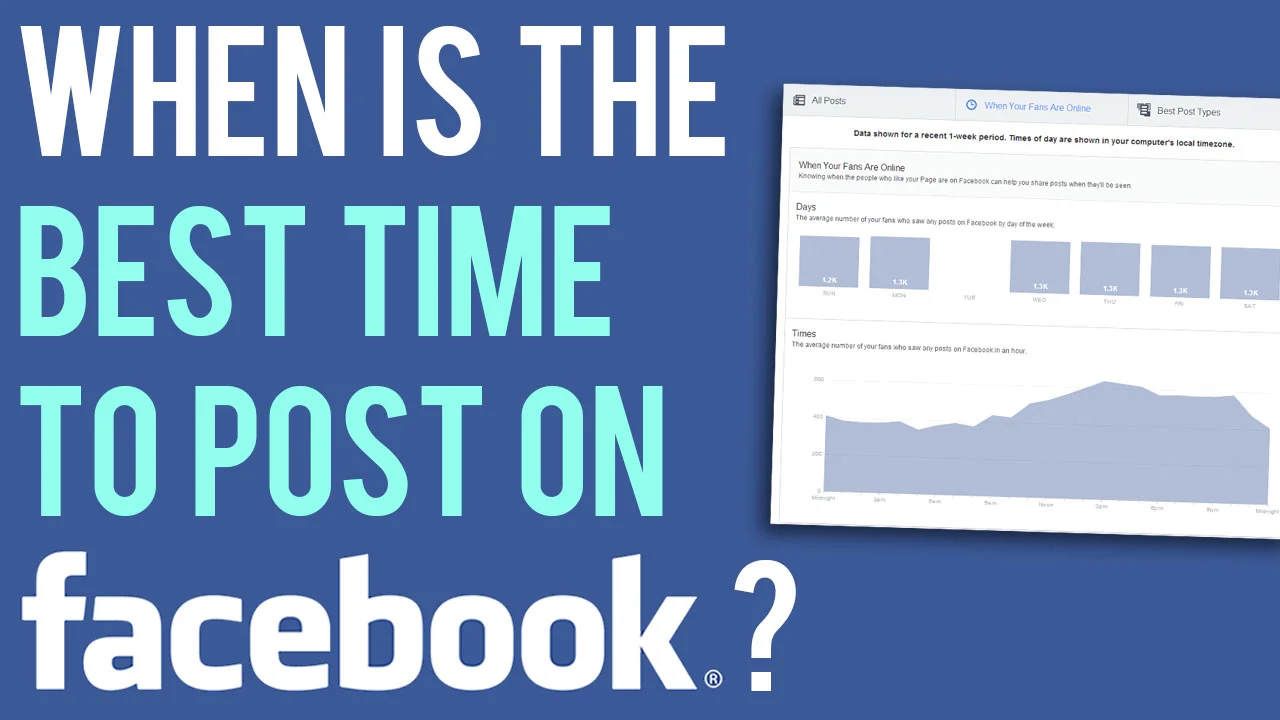
It's one of social media's oldest questions, and one that many a marketer has struggled to answer - when is the best time to post on my company's Facebook Page? The answer used to be a little difficult to decipher, but the recent overhaul of Facebook Insights now gives everyone a much clearer idea. 

Whoa! Watch out for time zones

Here's a screen grab from my own Facebook Page's Insights. And the first thing to note is that the data shown is from your own computer's local time zone.  This means that if, for example, you are advising a client in a faraway country on the best time to post on their Page by looking at their Insights, what you see as the best time won't  be the best time for them if they're several hours ahead or behind you. Be sure to do the maths and adjust the timing accordingly!

What days are your fans on Facebook? 

best-time-to-post-on-facebook-page-insights-when-fans-are-online.PNG

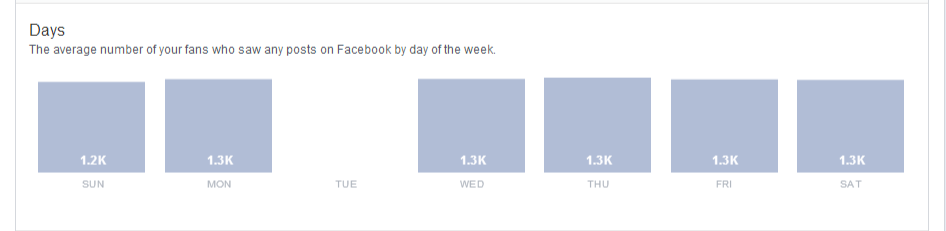
The next section takes your fans and tells you how many of them are on Facebook at any  time on any  day during the past week. In my example, Facebook tells me that 1.3 thousand of my fans (my current 'like' total is around 1.4 thousand) are online each day... not sure what happened to Tuesday!

What time of day do most of your fans see your Facebook posts? 

best-time-to-post-on-facebook-page-insights-when-fans-are-online-2.PNG

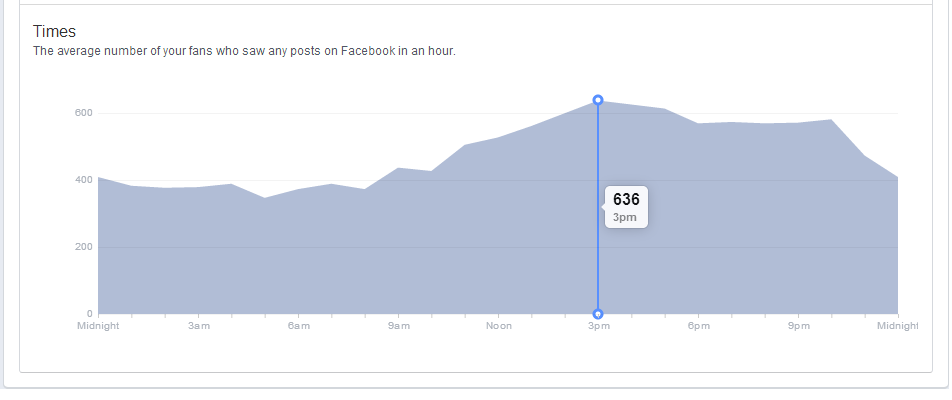
The last section of the page shows you the average number of your fans who saw any posts on Facebook in an hour - I'm assuming this is over the seven days shown above. Hover your mouse over the graph and you'll get figures the the one above, which shows me that the time that the most of my fans saw a post from me in the past week was 636 people at 3pm, on average.

Conclusion

Of course, taking just one week's figures and using them as a basis for all of my posting on Facebook would be unwise. However, by checking Insights regularly, I can begin to get a more detailed idea about when my fans are online, and optimise my posting strategy to catch as many eyes as possible. 


ABOUT THE AUTHOR 

Andrew Macarthy is the author of the #1 Amazon Web Marketing Bestseller, 500 Social Media Marketing Tips, available for Kindle and in paperback.

portrait-blog.jpg

How to Embed A Facebook Post | Facebook Embedded Posts Tutorial


What are embedded Facebook posts? 

Embedded posts are a way to lift publicly shared content from Facebook - either from a Page or personal profile - and place it on your website or blog. Embedded posts show any media attached to them, as well as the number of likes, shares, and comments associated with it. Even better, viewers are be able to follow or like authors or Pages on Facebook direct from the embedded content.

How to embed a Facebook post: getting the code

Before you embed a Facebook post, first you'll need to ensure that it is public. Do this by hovering over the audience selector next to the date of the post. If the post is public (signified by a globe icon), you're good to go.

Click on the 'down arrow' icon that appears in the top right corner of the post on Facebook and choose Embed Post from the drop-down menu that appears.

A pop-up window will appear along with the embed code for the post you want to use. Simply copy this code and paste it into the section of your website or blog post that you want it to appear.

Embedding Facebook posts FAQs

  • Currently, you can't customize how embeded posts are displayed on your website. The size of the post will be fixed to the same dimensions that it is displayed at on Facebook.
  • Long posts will be truncated. Viewers will be shown a "see more" link that can be clicked to view the embedded post in its enterity.
  • If an embedded post is later deleted or hidden by the original author, it will be replaced by a message that tells readers that that this is the case.

Live example of an embedded Facebook Post


Andrew Macarthy is the author of the #1 Amazon Web Marketing Bestseller, 500 Social Media Marketing Tips, available for Kindle and in paperback.

Buy 500 Social Media Marketing Tips
Amazon US: http://www.amazon.com/dp/B007L50HE6
Amazon UK: http://www.amazon.co.uk/dp/B007L50HE6

Follow Me:
http://www.facebook.com/500socialmediatips/
http://www.pinterest.com/andrewmacarthy
http://www.twitter.com/500socialmedia
http://www.youtube.com/500socialmediatips

portrait-blog.jpg

5 Ways Brands Can Use Hashtags on Facebook for Marketing | Facebook #Hashtags Marketing


Facebook recently introduced hashtags to its site - and about time too! - giving marketers a fascinating new tool to help try to boost engagement and interaction with their fans. Here are five ideas to help brands kick start their use of hashtags on Facebook: 

1. Add your hashtag to your cover photo

fb-cover-june-2013-v3.jpg

One of the easiest ways to promote your hashtag to fans is to feature it in your cover photo, whether it's a hashtag that will always stay the same (such as your brand name) or one that will change over time (like one related to a seasonal promotion). 

2. Search your hashtag and join the conversation

how-to-use-hashtags-on-facebook-business-marketing.PNG

Hashtags on Facebook give you a much easier way to find out what people are saying about you and your brand. So, search for mentions of your brand's hashtag periodically and join in on the conversation to help drive engagement and strengthen relationships with your customers. 

3. Use hashtags in your status updates and comments

Facebook hashtags work as clickable links in Page posts, personal profile posts, and in comments, so don't forget to feature them in these places where appropriate. With consistent use and the odd prompting, you will educate your customers to start using your hashtags too!

4.  Utilise your hashtag's unique URL to drive traffic and engagement

Each hashtag used on Facebook has its own feed and unique URL. In the above example, the hashtag is #500socialmedia to represent my book, and the URL is http://www.facebook.com/hashtag/500socialmedia. The format always stays the same: facebook.com/hashtag/yourhashtag

Use this knowledge to drive customers to your hashtag feed - especially in real world marketing material - to interact and engage. Utilise re-directs and URL shorteners like bit.ly to make a link to the feed more memorable.

5. Remember: #hashtags join across all Facebook-integrated services


One of the coolest things about Facebook hashtags is that their function is maintained across Facebook-integrated services. In the example above, I shared this image from my Instagram account to my Facebook fan page. The image's caption remained in tact, and its hashtags are there and clickable too. 

Conclusion

I hope this post has given you some inspiration for how you might use hashtags on Facebook as part of your own social media marketing strategy. Let me know how you intend to integrate hashtags in the comments below! 


ABOUT THE AUTHOR

Andrew Macarthy is the author of the #1 Amazon Web Marketing Bestseller, 500 Social Media Marketing Tips, available for Kindle and in paperback.

Buy 500 Social Media Marketing Tips
Amazon US: http://www.amazon.com/dp/B007L50HE6
Amazon UK: http://www.amazon.co.uk/dp/B007L50HE6

Follow Me:
http://www.facebook.com/500socialmediatips/
https://pinterest.com/500socialmedia/
http://www.twitter.com/500socialmedia

http://www.youtube.com/500socialmediatips

portrait-blog.jpg